Team roles
Everyone on your team gets the part of Evrella their work needs, and nothing else
Invite colleagues by email and choose each person’s role. Your front desk replies to visitors and looks after bookings, whoever looks after your content shapes what Evrella says, and your clients’ contact details stay with the people who need them.
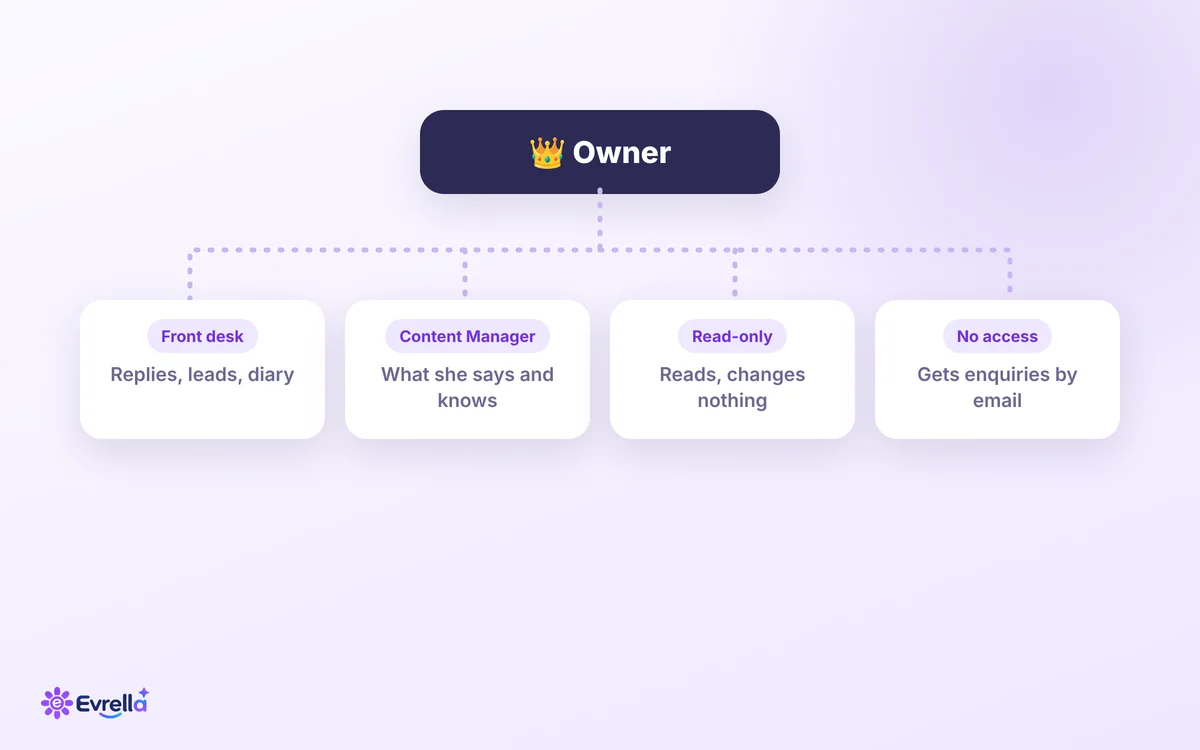
The roles
Who can do what
Owners and admins can do everything. Everyone else has one of five roles in Evrella, or no access to the console at all. Each description below is the one the console shows when you choose.
Owner and Admin
Owners and admins can do everything in Evrella, so they have no role in it.
Can
- Do everything in Evrella, from conversations to what she says
- Invite people and give each one a role
- Read the record of changes to how she speaks
Only the owner pays for Evrella, approves changes when approval is switched on, and can hand the organisation over.
Full access
Everything in Evrella except approving changes and channels.
Can
- Read conversations and reply to visitors
- Look after leads, customers and bookings
- Change what Evrella says and what she knows
- Change Booking’s settings: hours, services and the Google Calendar connection
Can’t
- Approve changes
- Manage channels such as WhatsApp
- Invite people or manage billing
Read-only
Reads conversations, customers and bookings. Changes nothing.
Can
- Read conversations, with customers’ contact details
- Read leads, customers and the bookings diary
- Read Evrella’s settings
Can’t
- Change anything
- Reply to visitors
Content Manager
Shapes what Evrella says. Doesn’t see customers’ contact details or reply to visitors.
Can
- Edit, try and publish Evrella’s personality and answer length, or ask the owner to publish when approval is on
- Manage your website pages, documents and written answers, and how often Evrella re-reads your website
- Work through the questions Evrella couldn’t answer
- Read conversations, with visitors’ email addresses, numbers and links hidden
Can’t
- See customers’ contact details, leads or bookings
- Reply to visitors
- Reach billing, people, install, websites or channels
Front desk
Replies to visitors and looks after leads and bookings. Never changes Evrella.
Can
- Read conversations and reply to visitors
- Look after leads and customers
- Keep the bookings diary: cancel a booking, change its status, block days
Can’t
- Change what Evrella says or knows
- Change Booking’s hours, services or Google Calendar connection
- Reach channels or the install code
Account Manager
Sets Evrella up and looks after the websites. Never sees customers, conversations or bookings.
Can
- Change Evrella’s settings and publish her personality, or ask the owner to publish when approval is on
- Manage what she knows: your website pages, documents and written answers
- Install Evrella and set up channels such as WhatsApp
- Change Booking’s hours and services
- Add websites and prove you own their domains
Can’t
- See conversations, customers, leads or the bookings diary
- Reply to visitors
- Read the questions visitors asked: they see only how many are waiting
- Change who is notified, or connect Google Calendar
- Reach billing, people or the daily message limit
No access
Somebody who does not use the console but should be told, such as a receptionist.
Can
- Get new enquiries and bookings by email, or by text on a UK mobile, when you tick them in Leads and Booking
Can’t
- Sign in to the console
Owners and admins choose a role when they invite someone, and can change it later in Manage organisation.
Why it matters
The right person in the right part of Evrella
A practice has people who answer clients, someone who keeps the website right and someone who signs off. Roles let each of them work in Evrella without seeing or changing what isn’t theirs.
Content work, without your clients’ details
A Content Manager works through the questions Evrella couldn’t answer and improves her answers, reading the conversations behind them with visitors’ email addresses, phone numbers and links hidden.
A front desk that can’t change what she says
Front desk works today’s enquiries: replies to visitors, follows up leads and keeps the bookings diary. What Evrella says and knows stays with you and whoever looks after your content.
Checked on every request
The console hides what a role can’t use, but a hidden button isn’t the lock. Evrella’s servers check each person’s role on every request, and refuse what it doesn’t allow.
Her personality
You decide when a change to how she speaks goes live
Evrella’s personality and answer length go through a draft before your visitors see them.
Draft, try, publish
Changes are saved as a draft. Ask Evrella anything in the console and she answers from the draft, before anyone publishes it.
Your approval, if you want it
Switch on “Require my approval to publish” and a publish or a restore by anyone else waits for you, the owner.
Every version kept
History lists every published version. Restore one and it is published again as a new version: nothing is ever rewritten.
Who changed what
Owners and admins can read the record of changes: every publish, request and approval, newest first, with who made it. Entries are kept for two years and never edited.
Invitations
Simple to invite, safe to hand out
Adding a colleague takes an email address and a role.
By email
Type their address and choose their role. They get an email with a link, and nothing changes until they accept it.
Seven days to accept
An invitation link works for seven days. Send it again and the new link replaces the old one.
Never more than you can do
Only owners and admins give roles, and nobody can give a role that can do things they can’t.
Free to leave
Anyone can leave an organisation themselves, and every organisation always keeps an owner.
PuglieseWeb support
PuglieseWeb support never sees your customers’ conversations, leads or bookings
When you ask us for help, our support team works in your organisation through a support session, acting as an Account Manager: they can set Evrella up and fix your website settings.
You’re told by email
You get an email each time a support session opens, and Manage organisation lists every session with who opened it and why.
It ends on its own
A support session ends by itself, and you can end it sooner from Manage organisation.
Yours to switch off
Switch off “Allow PuglieseWeb support sessions” in Manage organisation and nobody from PuglieseWeb can open one. Switching it off also ends a session that is open.
Bring your team into Evrella
Team roles come with every plan, the 30-day trial included, and no card is needed to start.