

Your browser is older than this site supports, so this page is showing without its design. To see it properly, update to Safari 15.4 or later, or to a current version of Chrome, Edge or Firefox.

Evrellaby PuglieseWebStart free

Multilingual AI chatbot

Answer every client in their own language. No translated website.

Evrella reads your pages in English and replies in the language each visitor writes in: Polish, Romanian, Spanish, Portuguese and many more. Every enquiry reaches you in English.

Multilingual

  • WhatsApp
  • Chat
  • CallsCustom plan
  • Leave your details
  • Book an appointment
  • Answers 24/7
  • Set up in minutes
  • 30 days free, no card

Why choose Evrella

Better for your clients, time back for you, at a price that fits

Swipe or scroll along the row.

  • A better experience for your clients

    Clients get the right information the moment they ask: a clear answer from your own pages, the link to read more, and a booking or a call back when they need one. No waiting for office hours.

  • Give yourself time back

    The questions you answer every week, by email, on the phone, at the end of a long day: Evrella answers them for you. Your hours go back to your clients and your work.

  • A sharper first impression

    Every enquiry gets a prompt, accurate answer from your own pages, in the client’s own language, evenings and weekends included. The first impression of a firm that is organised and always there.

  • A professional receptionist you can afford

    A receptionist used to mean a hire most small businesses could not justify. Evrella is yours from £49 a month.

Read what Sophisticated Cloud says about Evrella

Why it works better

New clients in their language, from the website you already have

An English-only website asks every one of these people to read about a fee, a deadline or their rights in a second language. Evrella answers them in their first.

people in England and Wales have a main language other than English
5.1 million
have Polish as their main language, the most common after English
612,000
have Romanian, the language that grew most in ten years
472,000
of them cannot speak English well, or at all
1 million

Translating your website

  • A copy of every page, in each language you pick
  • Every change to a fee or a service, made again in each copy
  • Only the languages you chose
  • Visitors still have to find the answer themselves

Evrella, on the website you have

  • Your pages stay as they are, in English
  • She re-reads your site every night or every week, so a new fee reaches every language at once
  • The language each visitor writes in, whichever it is
  • The answer, with a link to the page it came from
  • Every enquiry reaches you in English

Figures: Office for National Statistics, Language in England and Wales: Census 2021

A use case

One evening, one new client

An example from start to finish: a UK accountancy practice whose website is in English, and a self-employed plasterer who would rather ask about tax in Spanish. Nothing on the site was translated.

Swipe or scroll along the row.

  1. 1

    21:40

    He asks, in Spanish

    Diego is self-employed and needs someone for his tax return. He finds your practice one evening. Your website is in English; he asks in Spanish.

  2. 2

    21:40

    She answers in Spanish, from your English page

    Evrella searches your pages in English, writes the answer in Spanish and links the Fees page she took it from.

  3. 3

    21:41

    He leaves his details

    He asks for a call. Her buttons have switched to Spanish too, so leaving his name and number takes a few seconds.

  4. 4

    08:30

    You read it in English

    The enquiry email reached you the moment he sent it, written for you in English: what he asked, and the language he wrote in. The whole conversation waits in your console.

The same evening could run in Polish, Romanian or Portuguese: she answers in the language each visitor writes in, and the enquiry still reaches you in English. Her buttons, booking a time and the emails that confirm a booking are in English, Spanish, Italian, French and German.

Start 30 days free

What sets her apart

What makes Evrella different

Evrella isn’t a general-purpose chatbot. She is built for one role, the front desk of a professional or service business, and works from what you publish: she shows the page each answer came from, says so when your pages don’t cover a question, books the consultation or passes you the enquiry, and lets you write the answers that matter most yourself. She’s made by a UK company and hosted on AWS in London.

  • Secure, and built to scale

    Your data is encrypted at rest and in transit, kept to your own account and never used to train a model. She runs on AWS in London and grows with your traffic.

  • Easy to install on any website

    One line of code, with step-by-step guides for WordPress, Wix, Squarespace and Shopify. Nothing to rebuild.

  • Speaks your visitors’ languages, with no translated site

    She replies in the language each visitor writes in, from your pages as they are: there’s no translated copy of your website to pay for or keep up to date. She reports to you in yours.

  • Website, WhatsApp and phone

    She answers on your website on every plan. WhatsApp comes with Growth, and the phone is a custom set-up on Custom.

  • Answers from your pages, and says when she doesn’t know

    Every answer comes from your own pages and documents. If the answer isn’t there, she says so and takes the visitor’s details instead. She gives general information from your pages, not legal, financial or medical advice.

  • Books appointments

    Visitors pick a free slot from the calendar you already keep, inside the chat, and it’s confirmed there and then.

  • Tells you about every lead

    An email, and a text to a UK mobile, the moment someone leaves their details. Every lead waits for you in the console.

  • Reads your site and keeps up with it

    She reads your website and the documents you give her, then re-reads the site every night or every week, as you choose. Change a price and her answers follow.

How the console works

See Evrella Console at work

Screenshots of the working app: where your team follows every conversation, lead and booking.

Swipe or scroll along the row, and tap a screen to see it full size.

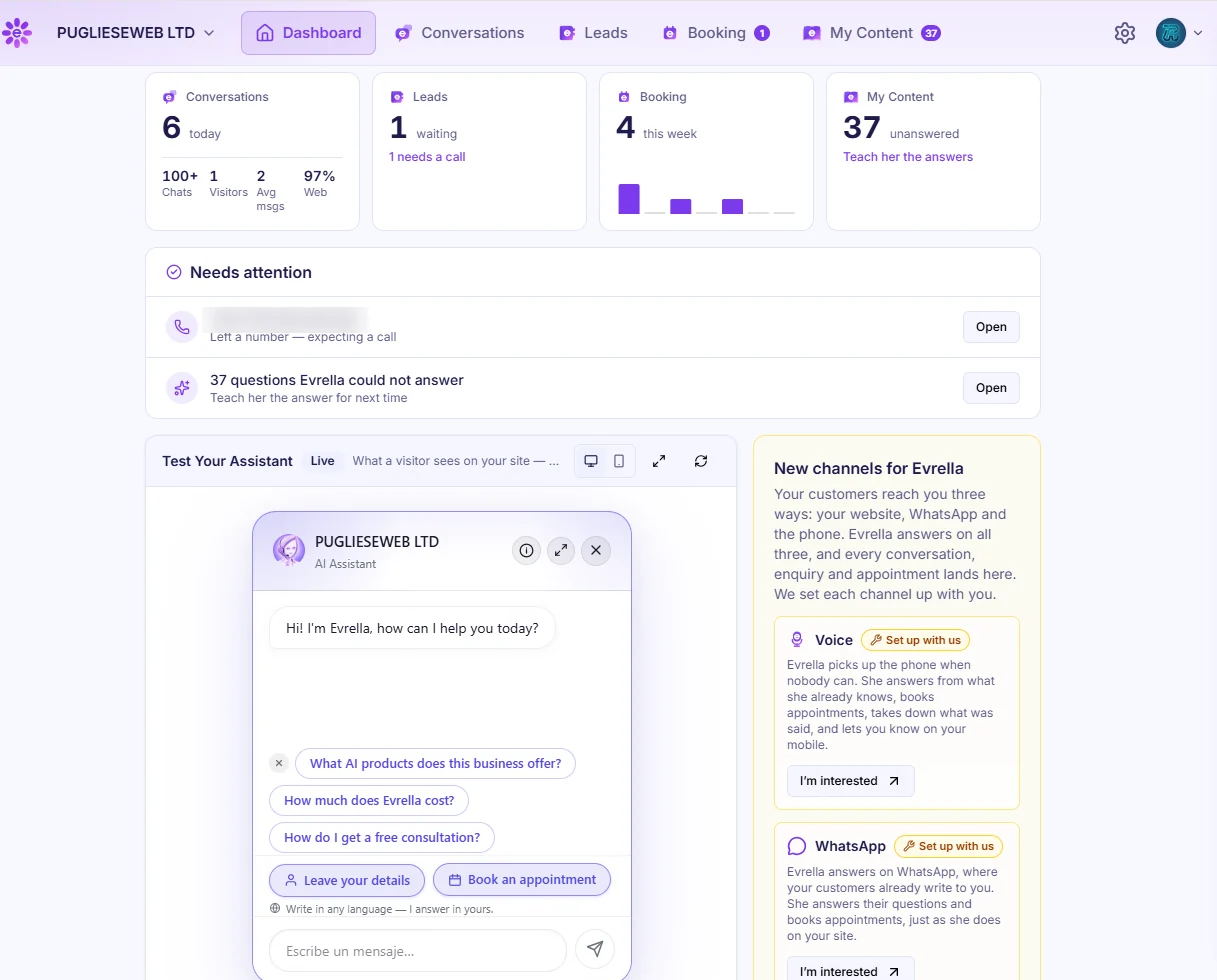
  1. View your dashboard

    01

    View your dashboard

    The dashboard shows today’s conversations, new leads, this week’s bookings and the questions waiting for an answer, and you can try her on the same page.

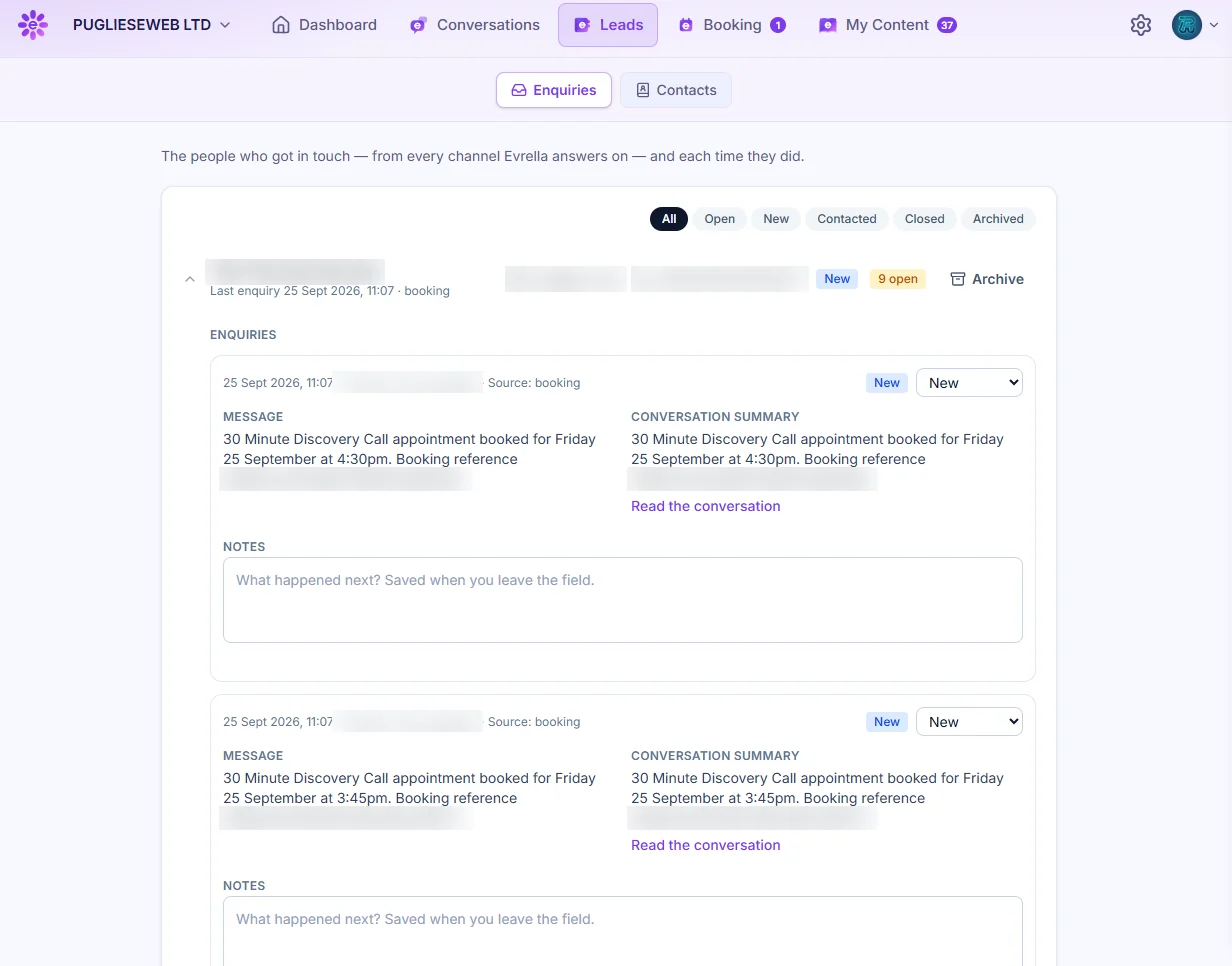
  2. View your leads

    02

    View your leads

    Everyone who gets in touch is listed with their details, what they asked for and a summary of the conversation. Add notes and follow each enquiry from new to closed.

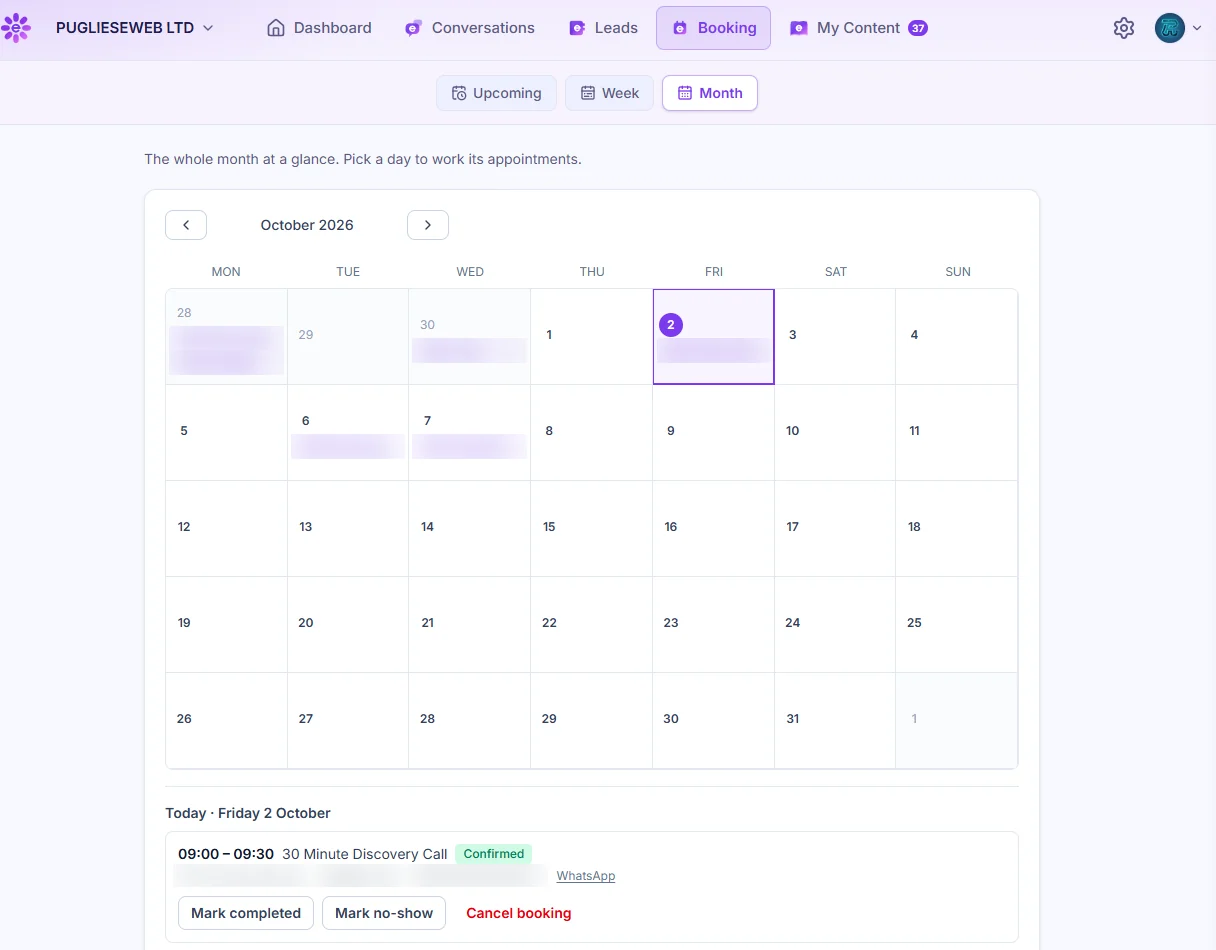
  3. View your bookings

    03

    View your bookings

    The appointments Evrella books are on your calendar. Open a day to mark each one completed, a no-show, or cancelled.

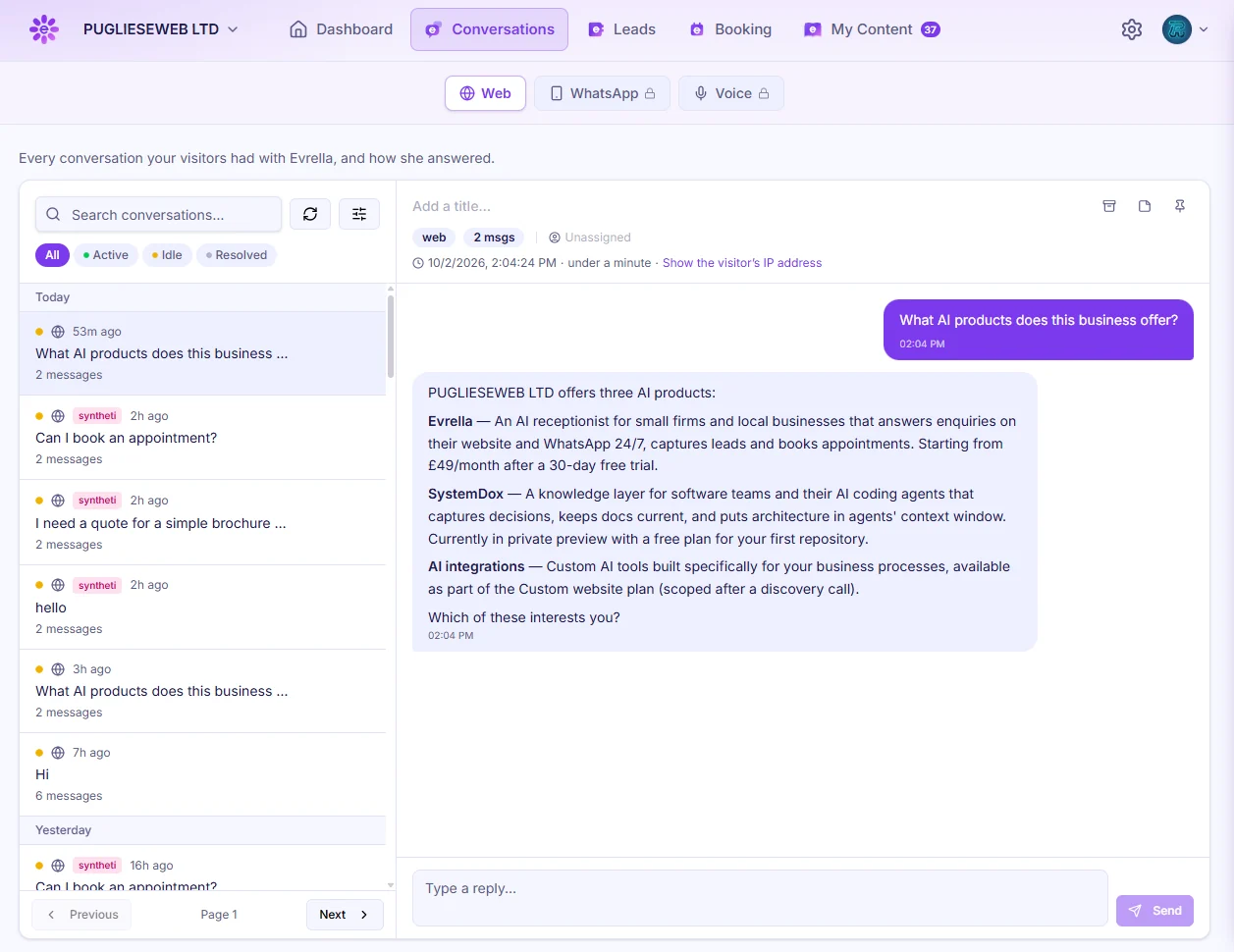
  4. View your conversations

    04

    View your conversations

    Read every conversation visitors have with Evrella. Search, filter, and reply yourself when you need to.

What it takes

What it takes, and what it costs.

What your business needs

  1. 1A website or documents with your up-to-date answers
  2. 2Someone who can paste one line into your site (there are guides for WordPress, Wix, Squarespace and Shopify)
  3. 3An email address for enquiries, and a UK mobile if you want them by text too

Terms

  • No set-up fee. Without a card by day 30 she pauses, and nothing is deleted.
  • She stops at the plan’s monthly limit, so there are no surprise bills.
Plans, limits and your trial

Pick a plan. Every one starts with 30 days free.

  • Starter

    £49 / month

    Every enquiry answered and booked

    • AssistantOn your website, with natural-language deep search, linking the page or document she used
    • MultilingualAnswers in each visitor’s own language, no translated website needed
    • LeadsEvery enquiry by email and text
    • BookingFrom the calendar you already keep
    • Replies600 a month, about 150–200 conversations
    • Knowledge60,000 words
    • WebsitesOne website
    • WhatsAppNot included
    • BusinessesOne business
    • VoiceNot included
  • Custom

    Talk to us

    Everything in Growth, plus a custom phone set-up, your own systems and work we do for you

    • AssistantWherever you need her, with natural-language deep search, linking the page or document she used
    • MultilingualAnswers in each visitor’s own language, no translated website needed
    • LeadsConnected to the systems you already run
    • BookingFrom the calendar you already keep
    • RepliesNo ceiling
    • KnowledgeNo ceiling
    • WebsitesAs many as you need
    • WhatsAppYes, set up with you
    • BusinessesSeveral businesses under one sign-in, each its own organisation
    • VoiceYes, on your number, set up with you

Yearly prices, limits and channels

What practices ask about languages

“Do we have to translate our website first?”

No. She reads your pages in English and answers in the language the visitor writes in, so there is nothing to translate, and nothing to keep in step when a page changes.

“Which languages does she answer in?”

The one each visitor writes in: Polish, Romanian, Spanish, Portuguese, Italian, French, German and many more. Her buttons, booking a time and the emails that confirm a booking are in English, Spanish, Italian, French and German; in any other language they stay in English.

“How do we read an enquiry written in Polish?”

In English. The enquiry email gives you a short summary of what they asked, written in English, and the whole conversation waits in your console.

“Nobody here speaks their language.”

Nearly four in five people whose main language isn’t English also speak English well (Census 2021). Asking in their own language is simply easier, and the call that follows can be in English. If a colleague speaks theirs, the conversation in your console shows them where to start.

“Can she get it wrong in another language?”

She answers only from your own pages and links the page each answer came from, so the client can check it. When your pages don’t cover a question, she says so and takes their details. She gives general information from your pages, not legal, financial or medical advice.

How to install

Put her on your website

Screenshots of the working app, from reading your site to putting her on it: one line of code, with step-by-step guides for WordPress, Wix, Squarespace and Shopify.

Swipe or scroll along the row, and tap a screen to see it full size.

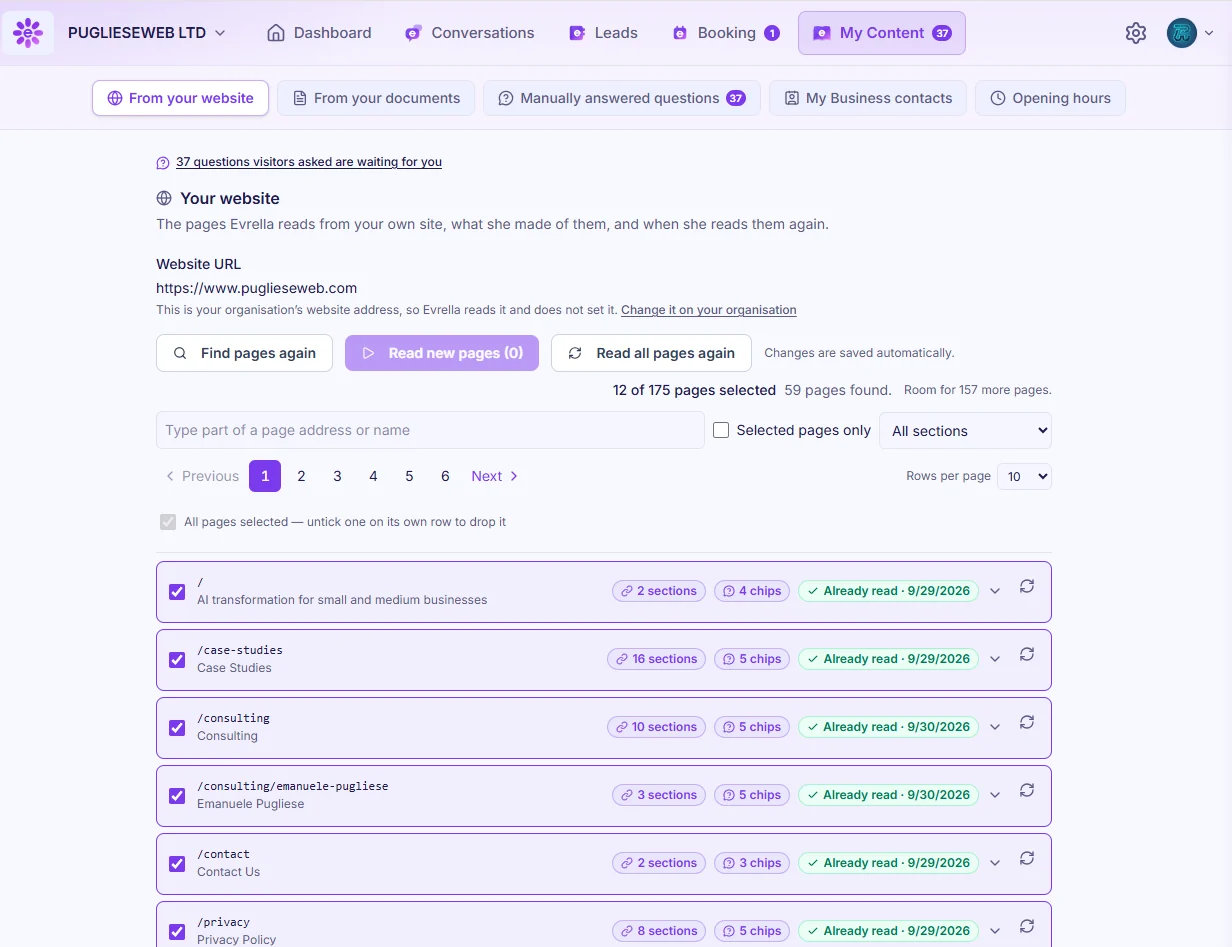
  1. Read your site

    01

    Read your site

    Evrella reads the pages of your website and keeps track of what she learned from each. You choose which pages she uses and when she reads them again.

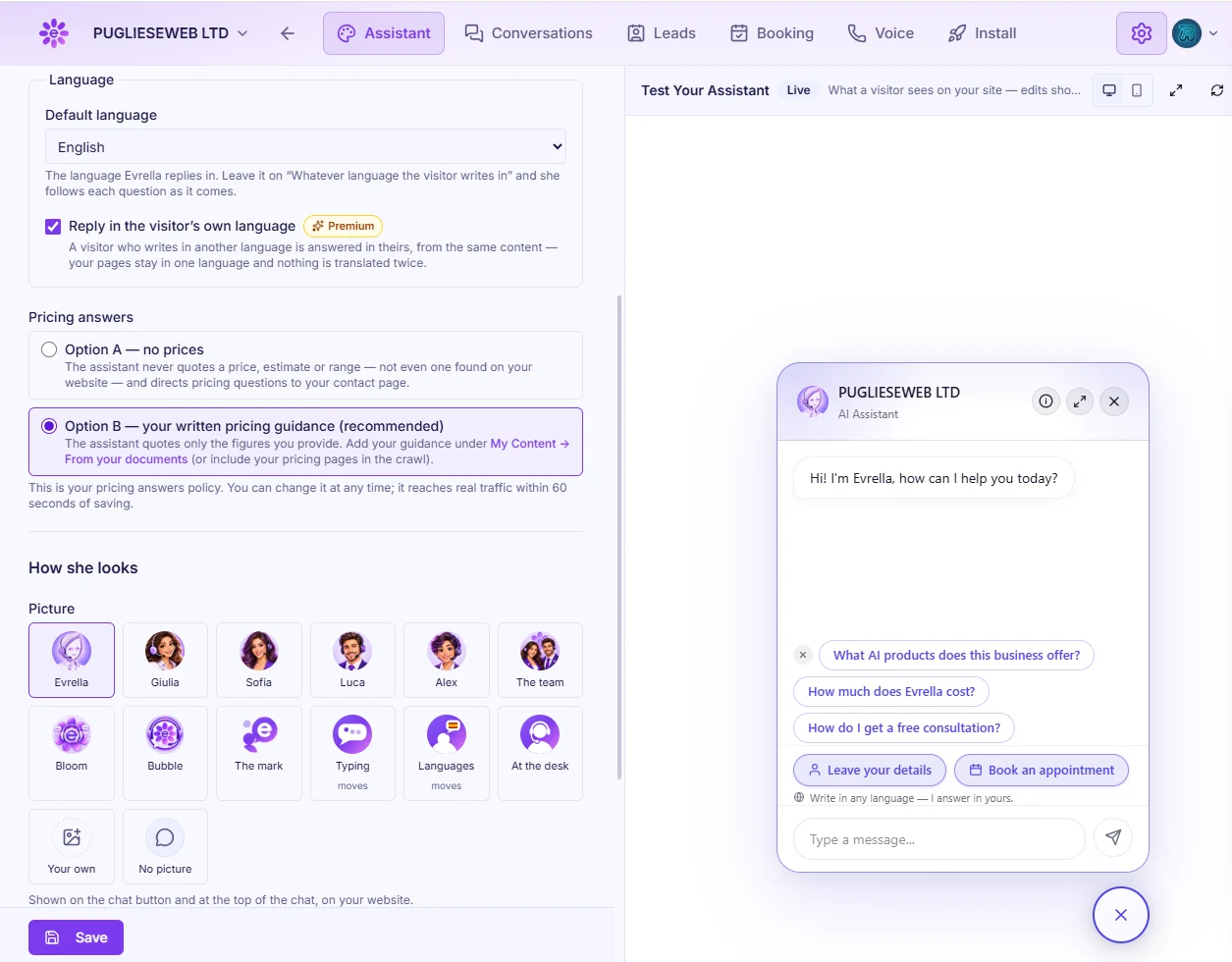
  2. Configure your assistant

    02

    Configure your assistant

    Choose her language, how she handles questions about prices, and the picture visitors see. The preview beside it shows each change straight away.

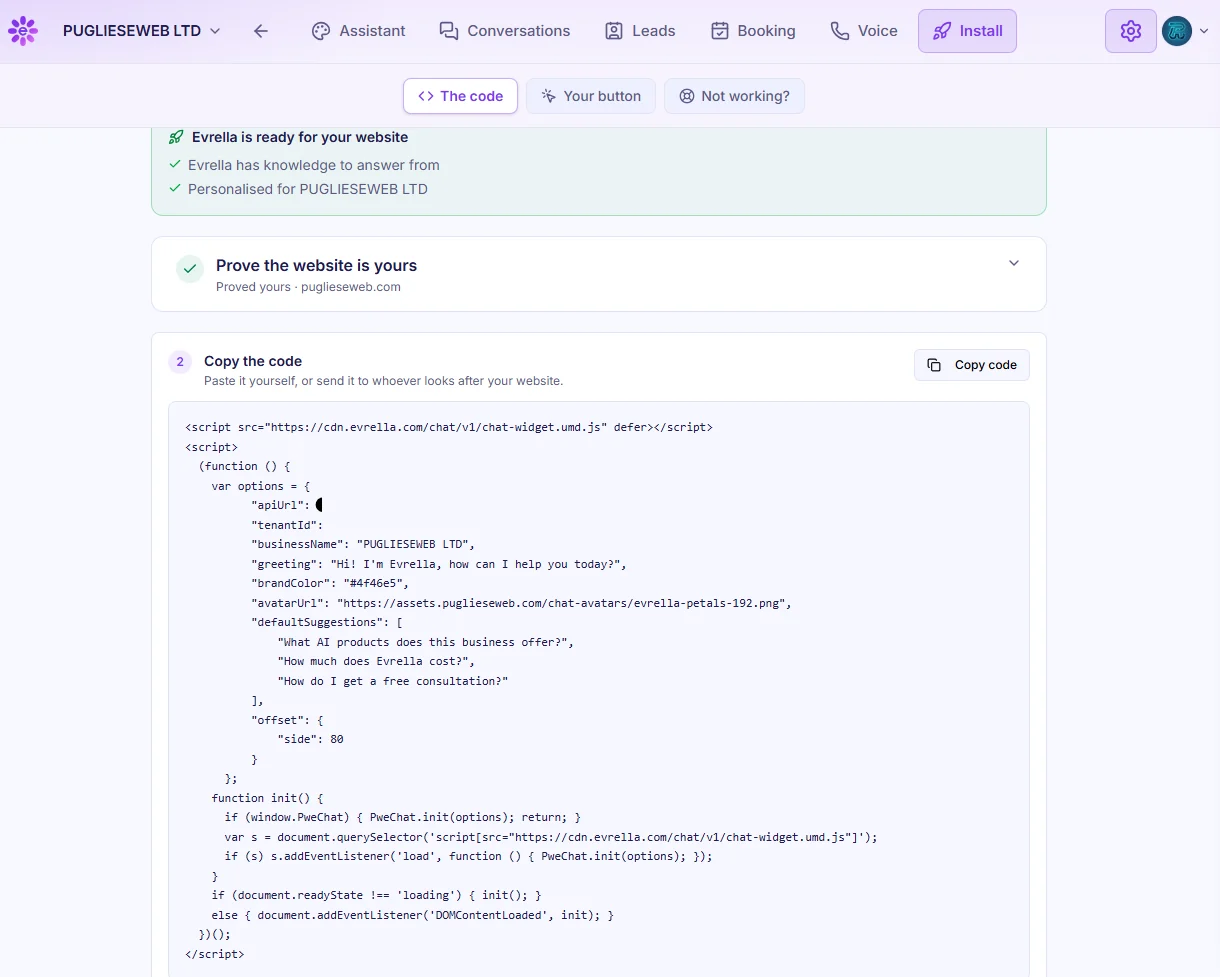
  3. Install on your website

    03

    Install on your website

    Prove the website is yours, then paste one short snippet into it, or send it to whoever looks after your site.

You’re not on your own while you set her up

  • Getting started

    A checklist in the console’s side bar takes you through four steps: teach Evrella, personalise her, choose what she does, and install her. The first three tick themselves once the console sees them done.

  • Evrella Help Desk

    Beta

    A guide built into the console answers how to set her up, what a setting does and how to put her on your website. It can see your settings, never your website or your visitors’ conversations.

  • A person when you need one

    If the Help Desk’s answer isn’t what you needed, choose “Talk to a person at puglieseweb”: our support team picks up the same conversation and replies there. Or email info@evrella.com.

Start 30 days free

Who builds it

Who is behind her, and where your data goes.

Emanuele Pugliese, founder of PuglieseWeb

Emanuele Pugliese

Founder, PuglieseWeb

15+ years of cloud architecture in payments, at Discover and Capital One

Emanuele runs Evrella the way he ran payment systems: every decision written down, nothing reaches production by hand, and a measured cost behind every plan.

Emanuele’s profile and recommendations

Data, infrastructure, responsibility

  • Evrella is built and run by PuglieseWeb Ltd, registered in England and Wales (company number 17078772).
  • Stored in the UK, on AWS in London. Answers are generated in the UK or the EU, so what a visitor types may be processed in the EU. Never used to train AI models.
  • Links in her answers can only point to your own pages: any other link is removed before the visitor sees it.

Where your data goes

What a customer says

In a customer’s words

I’ve now installed Evrella on the Sophisticated Cloud website and I’m very happy with it. It feels like a natural addition rather than something that has been bolted on for the sake of having an AI feature. For me, the appeal is simple. My website can now provide another level of assistance to visitors when I am not at my desk, while still directing people towards me when they need a conversation with a real person.

Sophisticated CloudClaudia TinnirelloFounder, Sophisticated Cloud

Read the full article

Our first customer was us

We built what we needed, and ran it on ourselves first

PuglieseWeb helps businesses move to AI-driven processes, safely and under control. We only sell products we run on our own business, and Evrella is one of them.

Like most small firms, we couldn’t answer every enquiry the moment it arrived and still do the work. Today Evrella answers our clients on our website and on WhatsApp, day and night. If it didn’t work for us, we wouldn’t sell it to you.

Who uses Evrella

  • PuglieseWeb

    PuglieseWeb: our own support, since day one

  • CSTAI srl

    CSTAI srl: automation and innovation, Italy

  • Sophisticated Cloud

    Sophisticated Cloud: web design studio, Hampshire

Open your practice to every language

Keep your website as it is. Every plan starts with 30 days free, and no card.